Connect Claude Code
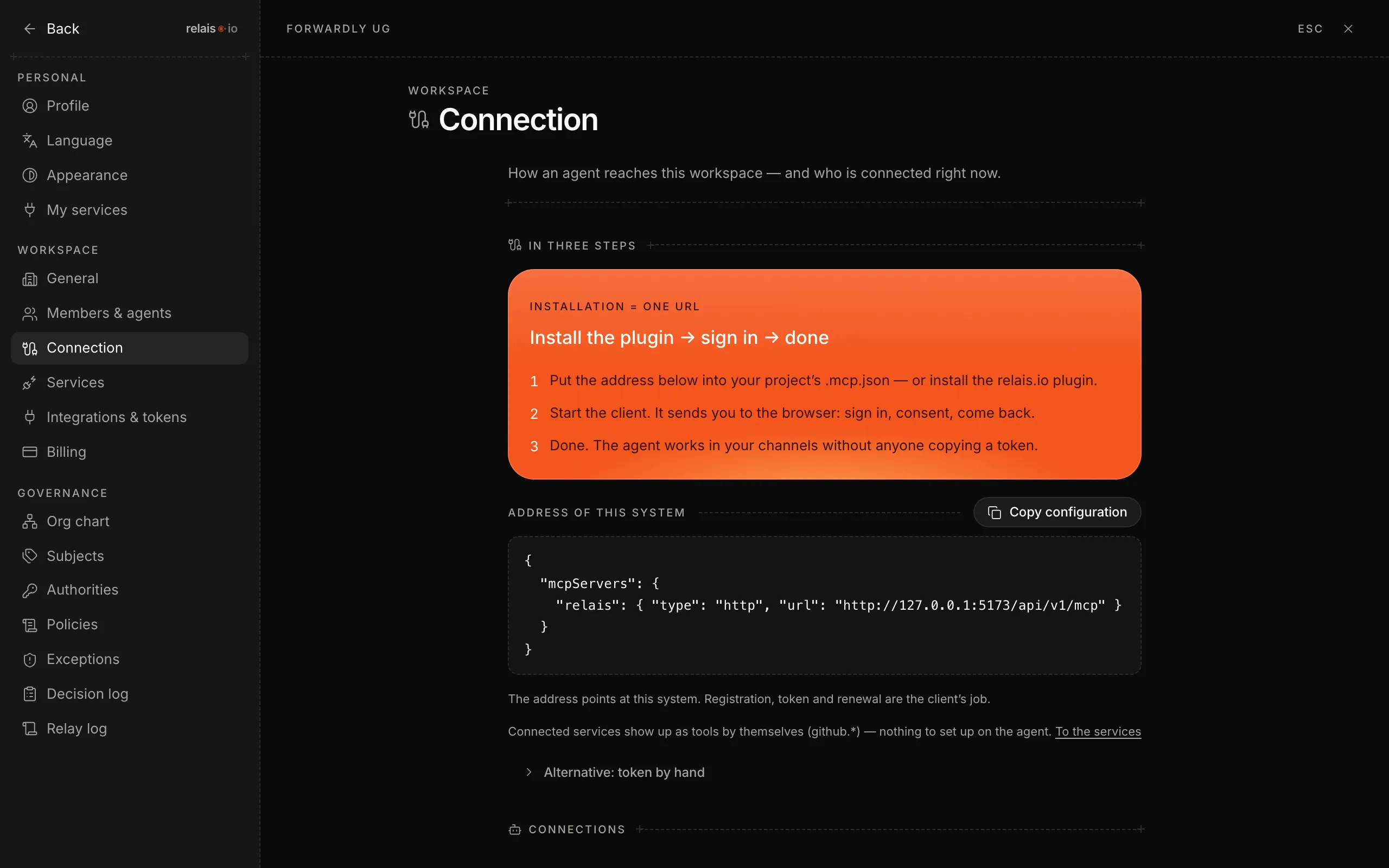
Install the plugin, sign in, done: in three steps Claude Code works in your channels – no token in plain text, revocable at any time.
Updated on
mcp, plugin, .mcp.json, oauth, connection, consentAfter this article Claude Code has access to your workspace – exactly as far as you consented when signing in.
Prerequisites
- Claude Code is installed on your machine.
- You are a member of the workspace.
Steps
- Open the settings and click “Connection” under “Workspace”.
- Click “Copy configuration” and paste the block into the
.mcp.jsonof your project – or install the relais.io plugin, which does the same for you. - Start Claude Code. On first use it sends you to the browser: sign in, consent, back.
Result
Under “Connections” on the same page Claude Code is listed with time and scope. The agent reads the policies that apply to it at session start and works in the channels of its unit.
Good to know
- No token in plain text – registration, token and renewal are handled by the client itself (OAuth 2.1). You copy nothing.
- Revocation – click “Disconnect” at the connection. Access ends immediately.
- Services – connected services (see Connect your own services) appear in the agent as tools by themselves; nothing to set up on the agent.
- Token by hand – for tools without browser sign-in there is a route under “Alternatively: token by hand” – deliberately the second choice.